DATA & INSIGHTS
Complete Visibility at Every Level
AlwaysOnline doesn't just deliver curriculum — it delivers insight. A four-tier dashboard ecosystem ensures every stakeholder sees exactly what they need, when they need it, to help students succeed.
FOUR TIERS OF VISIBILITY
Every Stakeholder Sees What They Need
From individual students tracking their own progress to leadership asking complex questions in plain English — data flows through every level of your school.
Student
Personal dashboard with pacing guides
Self-Awareness & Ownership
Teacher
Class-wide monitoring, identifying students at risk
Proactive Intervention
Administrator
School-wide trends and all data
Strategic Decision-Making
Leadership
QuickSight Q — ask anything
Instant Insights
TIER 1
Student Dashboard
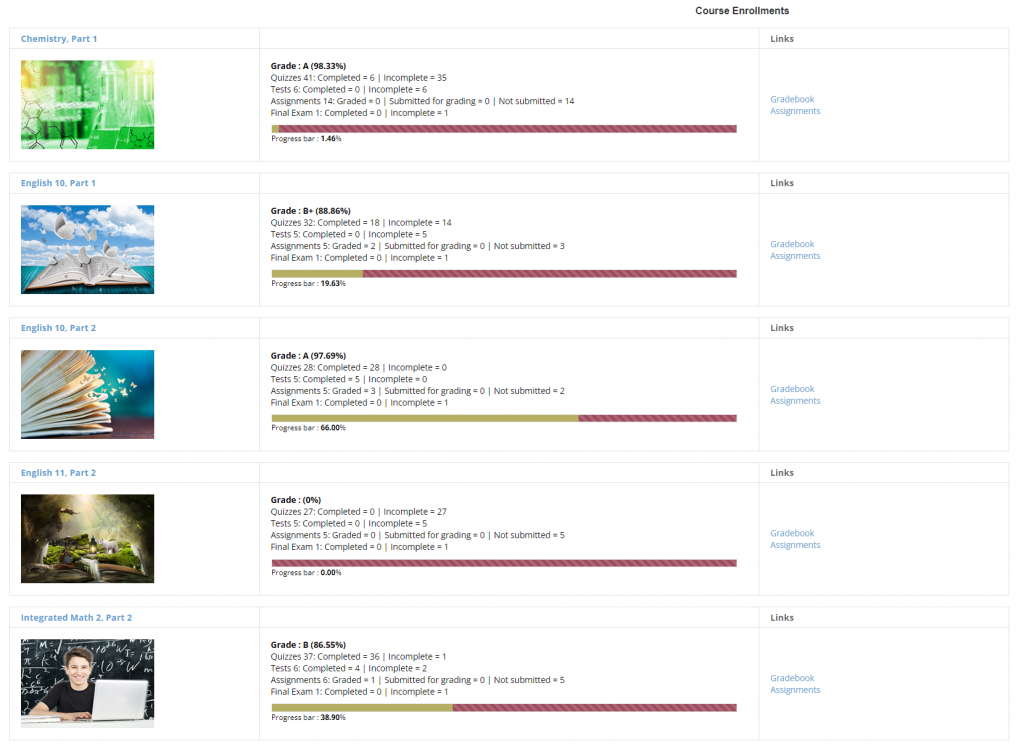
Students track their own progress through a personal dashboard with built-in pacing guides. Self-paced doesn't mean self-guessing — students always know exactly where they stand and where they need to be.

Personalized Pacing Guide — Powered by Zip
Zip, our AI pacing coach, works with each student to set a target completion date and builds a personalized day-by-day schedule to get there. If a student falls behind, Zip sends a nudge and adjusts the plan — so small slip-ups never become big problems.
Assignment Tracking
Clear view of completed, pending, and upcoming assignments with due dates
Grade Summary
Running grade calculations with performance trends across each course
AI Tutor Access
One-click access to Sage AI Tutor for 24/7 personalized learning support
▶ VIDEO WALKTHROUGH — Navigating the Student Dashboard
TIER 2
Teacher Dashboard
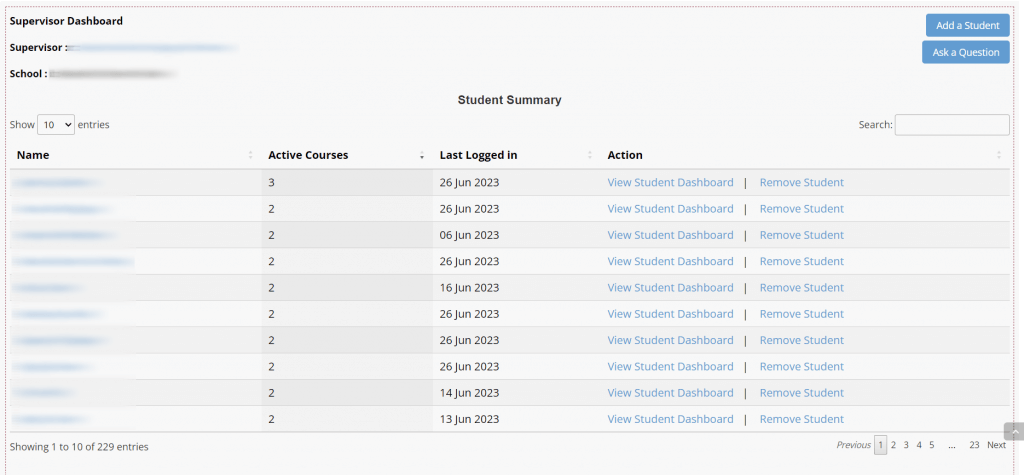
Teachers get a clear, at-a-glance summary of their entire class — then can drill down into any individual student's dashboard for a deeper look at progress, activity, and performance.
Class-Wide Summary View
See a high-level snapshot of all students in one place — who's active, where they are in the course, and how they're doing overall
Per-Student Drill-Down
Click any student to open their individual dashboard and review their activity, progress, and grades in detail
Designed for Teacher Workflow
The dashboard is built around how teachers actually work — quick overview first, detail on demand
"Data doesn't replace teacher judgment — it informs it. Teachers still decide how to help; the dashboard shows them where to look."
TIER 3
Administrator Dashboard
Administrators see the big picture — every course, every teacher, every student trend. Powered by AWS QuickSight and QuickSuite, the data you need for board presentations, accreditation reports, and day-to-day decisions is always current and accessible.
Drill down from the school-wide view into any teacher's dashboard — then further into any individual student's experience.
School-Wide Progress
Comprehensive view of all programs, courses, and student outcomes across the school via QuickSight analytics
Drill-Down Navigation
Click into any teacher's dashboard to review their classes and performance, then drill further into any individual student's dashboard
At-Risk Student Identification
School-wide early warning system to catch struggling students across all courses before they fall behind
Compliance & Reporting
Ready-to-use data for board presentations, accreditation reviews, and district reporting
School-Wide Overview
Spring 2026
Active Students
342
Completion Rate
91%
Active Courses
24
At-Risk Students
12
Top Performing Courses
AP English
96%
World History
94%
Chemistry
89%
TIER 4 — BREAKTHROUGH ANALYTICS
Ask Questions in Plain English. Get Instant Answers.
AWS QuickSight Q transforms complex data into actionable insights — accessible to everyone through natural language queries. No technical expertise required. No IT involvement. No waiting for reports.
EXAMPLE QUERIES YOU CAN ASK
"Which students are at risk of not completing on time?"
"How do completion rates compare between semesters?"
"Which courses have the highest failure rates?"
"Show students active last month who haven't logged in this week"
"Compare student performance across implementation models"
Why This Changes Everything
No competitor in educational technology offers natural language querying at this level. This isn't an incremental improvement — it's a fundamental transformation in how schools use data.
TRADITIONAL ANALYTICS
✗ Technical staff for queries
✗ Days or weeks for reports
✗ IT involvement required
✗ Expensive BI tools
QUICKSIGHT Q
✓ Type a question
✓ Answers in seconds
✓ No technical skills needed
✓ Included with platform
THE COMPLETE PICTURE
Proactive, Not Reactive Education
When every stakeholder has visibility at their level, education transforms. Problems are caught early, decisions are evidence-based, and no student slips through the cracks.
Student Falls Behind
Pacing guide shows student they're behind schedule — student self-corrects or seeks help
Teacher Gets Alerted
Dashboard flags the student immediately — teacher intervenes with targeted support
Admin Sees Trends
If patterns emerge across classrooms, administrators allocate resources where needed
Leadership Asks Why
QuickSight Q reveals systemic patterns — leadership makes data-driven strategic decisions
Students who start falling behind are identified immediately — not at mid-term
Teachers intervene early — when small adjustments prevent major problems
Administrators allocate resources based on evidence — not assumptions
Leadership asks questions and gets instant answers — without waiting for reports
EXPLORE THE PLATFORM
See What Powers the Dashboard Ecosystem
QuickSight Q Analytics
Deep dive into how natural language querying transforms educational decision-making.
Learn more →

AI Assistants & Sage Tutor
Seven AI assistants providing 24/7 personalized student support across every course.
Learn more →
AWS Enterprise Infrastructure
Near 100% uptime, automatic disaster recovery, and zero IT burden for your school.
Learn more →